3.1. Working with the program
To start the program you have to click the left button on your mouse twice on this icon:

After starting the program you will see this image on the screen which in WINDOWS terminology is called “The main window”:
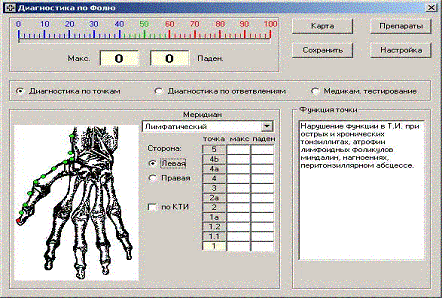
The order of operation with this program is the following:
1. Choose the patient’s medical card (or create a new one). That can be accomplished by clicking on the “medical card” button.
2. Measuring the embranchments. For that, click on the “Diagnostic by embranchments” button. You can save the results of the measurements by clicking the “Save” button.
3. Conducting diagnostic measurements of biologically active points according to the R. Voll method. Click on the “Diagnostic by points” button. Results can be saved by clicking the “save” button.
4. According to the measurements, you can conduct testing – selecting the appropriate devices according to the points. It is possible to save the selected devices in the patient’s medical card. For that, click the “testing” button.
5. If needed, it is possible to enter the necessary information into the medical card such as complaints, diagnosis, prescriptions, and print it.
6. To exit the program, simply click the “X” button located in the upper right corner of the window.
ATTENTION! This program automatically saves the results of the measurements.
|